Most guides to booking KTX tickets that are floating around right now are already out of date, and it’s not their fault — the timing is just bad. On September 1, 2026, Korail and SR Corporation (the company that ran SRT) officially merged into one operator. If you search for “KTX vs SRT” today, you’ll still find a wall of articles explaining two separate companies, two separate apps, and a trick where you check SRT if KTX shows sold out. That workaround doesn’t exist anymore, because there’s no longer a second, separate seat inventory to check.
So instead of another explainer, here’s what actually happens when you go to the real site and book a ticket today.
First: what changed, in plain terms
- Korail and SRT merged into a single company. Fares on former KTX routes dropped by roughly 10% to match what SRT used to charge, and the mileage/rewards program was unified too.
- There’s now one seat pool per route instead of two. If a train shows sold out, checking “the other company” won’t turn up hidden seats — they’re the same inventory now.
- A new app, Korail+, launched to handle bookings across both networks. The older Korail Talk and SRT apps are still around during the transition, but they’re being phased toward the unified system.
- For booking from a browser instead of an app, everything now runs through Korail’s own site rather than two separate domains.
Because the merger only took effect on September 1, 2026, some of this was still settling in the weeks right after launch — station-level quirks, whether an old SRT membership carries over automatically, and so on. If something on the site looks different from what’s described here, a post-launch adjustment is the most likely reason; the underlying steps below should still hold. Field labels and exact screen layout can shift slightly as Korail refines the new system, so treat this as the route to follow rather than a pixel-perfect match to what you’ll see.
The one link you actually need
www.korail.com/global/eng — this is Korail’s official English-language site for international travelers. Bookmark this one link instead of trying to remember two.
The reservation page specifically is here: korail.com/global/eng/ticket/reservation
Now here’s what to actually do on it.

Step 1 — Open the reservation page and set up your account
Go to the reservation link above. If this is your first time, you’ll need to register an account before you can pay for anything — browsing train times doesn’t require it, but checkout does.
When you register, you’ll be asked for a passport number, not a Korean resident registration number. This hasn’t changed with the merger; foreign travelers have always registered this way, and it’s still true now. Fill in your name exactly as it appears on your passport — mismatches here are one of the most common reasons a ticket gets flagged at boarding.
If you had a separate SRT account from before September 2026, don’t assume it automatically carries into the new system. Register fresh on the Korail site if you’re not sure, rather than finding out at the station that your old login doesn’t work.

Step 2 — Search your route
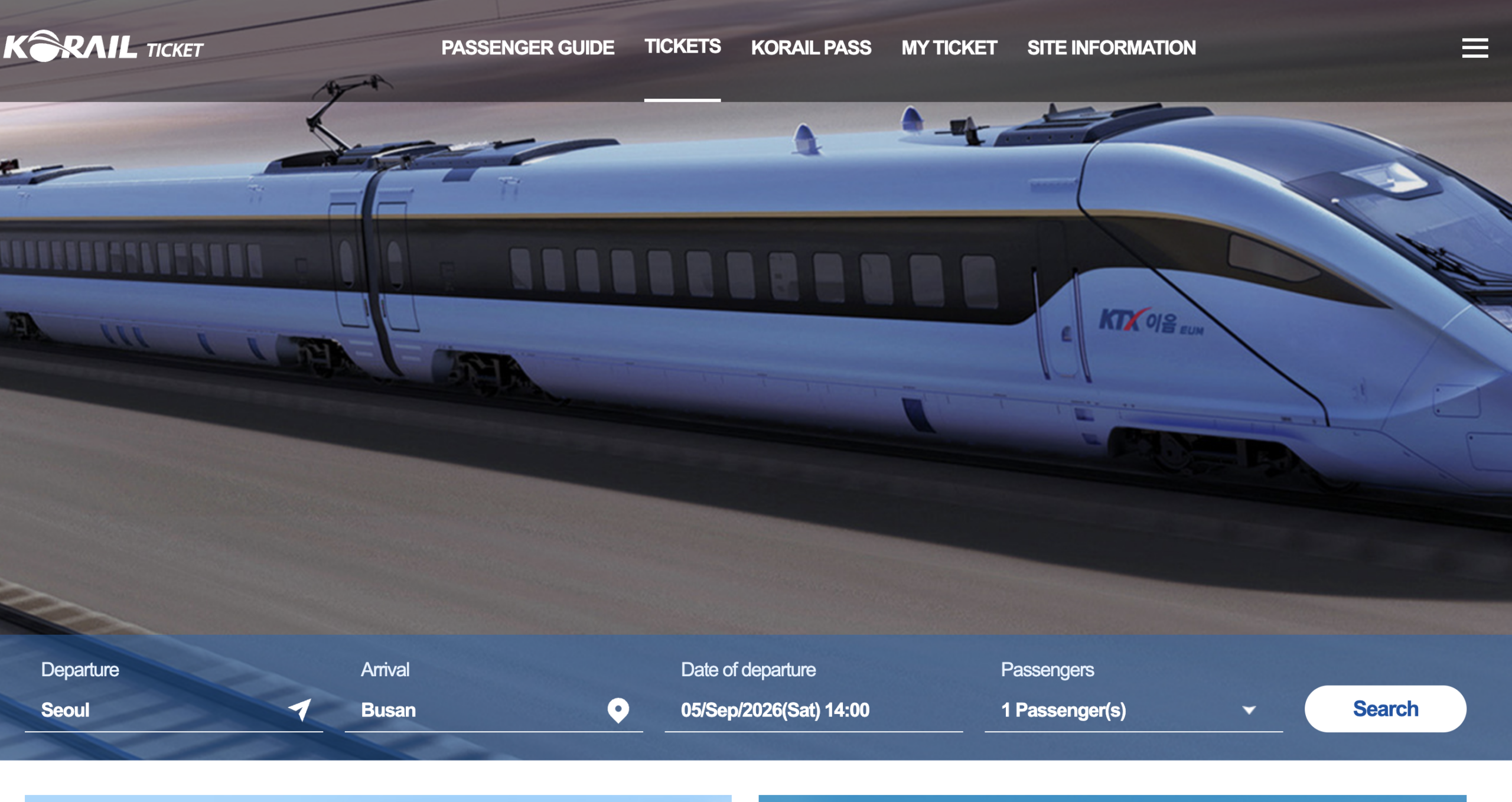
On the reservation page, you’ll fill in four things: your departure station, your arrival station, your travel date, and how many passengers are traveling. Set these first, then hit search. One small quirk worth knowing: the date field’s placeholder text sometimes shows in Korean even on the English site — that’s just a placeholder, not a sign you’re on the wrong page. Click it and the calendar that pops up works normally.
Also worth knowing before you search: you can only book up to one month ahead of your travel date. If you’re planning further out than that, bookmark the page and come back closer to your trip — trying to search a date more than a month away just won’t return anything.
One real difference after the merger: routes that used to be KTX-only or SRT-only now show up together in the same results. If you’re going from Seoul to Busan, for example, you don’t need to think about which company runs which train anymore — they’re just listed as departure times.

Step 3 — Compare the actual results, not just the first one
The search results list trains by departure time, with the price and remaining seats next to each. This is the part worth slowing down on:
- Departure station matters. Some trains leave from Seoul Station, others from Yongsan, and a few former-SRT routes still depart from Suseo. If you’re not staying near the station a particular train leaves from, factor that travel time in before you book.
- Price differences are smaller now than before the merger, since former KTX fares came down to match SRT’s pricing. Don’t assume one option is automatically cheaper — check the actual number next to each train.
- If your preferred time shows no seats, that’s a real sold-out, not a “try the other app” situation. Look at the next closest departure time instead.
Step 4 — Select your seat
Click a train, and you’ll be able to choose a seat class (standard or first class on most routes) and, usually, a specific seat — window or aisle. If you don’t have a preference, letting it auto-assign is fine; it won’t put you somewhere unreasonable.

Step 5 — Pay, and what to do if your card doesn’t go through
This is the step where foreign travelers most often get stuck, and it’s not something you’re doing wrong. International cards get declined on Korean payment gateways more often than they should, for reasons that have nothing to do with your card being valid.
If your card is declined:
- Try once more in case it was a temporary gateway issue — but don’t keep retrying the same card more than twice.
- Switch to a different card if you have one. Visa and Mastercard tend to go through more reliably than Amex on Korean sites.
- If it still won’t work, this is where a third-party booking service (Klook, Trainpal, and similar) genuinely earns its small service fee — their checkout is built specifically to handle international cards that Korean gateways reject.
- As a last resort, station kiosks and counters accept cash and often succeed with cards that failed online, since they run through a different payment terminal.
Step 6 — Find your ticket
Once payment goes through, your e-ticket appears in your account with a QR code — no printing required. Take a screenshot before you head to the platform, just in case you lose signal underground near the station.
What to do if you get stuck
Your booking says “sold out” but you need to travel that day. Ask at the counter about standing tickets (입석). These are sold separately from seated tickets and are often still available even when every seat is gone, especially on shorter routes like Seoul–Daejeon.
You need to cancel. Cancellations and changes go through your account on the same site. Under the fee schedule that applied to Korail tickets before the merger, cancelling was generally free up until about a day before departure on weekday tickets, a small flat fee applied to weekend/holiday tickets cancelled more than a day out, the fee rose to a percentage of the fare the closer you got to departure, and not showing up at all cost significantly more than cancelling even a few minutes ahead. Whether this exact schedule carried over unchanged after the September 2026 merger hasn’t been independently confirmed here, so check the fee shown on your own booking’s cancellation screen, or Korail’s official refund and cancellation guide, before you rely on it — but the underlying logic (cancel earlier, pay less; no-show costs the most) is a safe bet either way. If your plans change, cancel as soon as you know rather than waiting.
You’re traveling with large luggage. It goes in the racks near the doors at the end of each car, not the overhead shelf above your seat. On busy routes, get to your car a few minutes early — that space fills up fast.
One thing worth knowing before you book anything
For the first few months after the September 1, 2026 launch, it’s genuinely worth booking a day or two before you actually need to travel rather than same-day — not because ticket availability changed, but because a brand-new booking system is more likely to have a form field behave oddly or a payment step glitch in its early months than one that’s been running for years. Giving yourself a buffer means a hiccup is an inconvenience, not a missed train. Once the system has been live for a while, same-day booking should be as reliable as it always was.
How Does Food Delivery Work in Korea? What Foreign Visitors Should KnowHow Does Food Delivery Work in Korea? What Foreign Visitors Should KnowHow Does Food Delivery Work in Korea? What Foreign Visitors Should KnowHow Does Food Delivery Work in Korea? What Foreign Visitors Should KnowHow Does Food Delivery Work in Korea? What Foreign Visitors Should Know